
If you build Roblox experiences, you've probably weighed VizzBees against ForgeGUI — two AI tools aimed at the visual side of shipping a game. They overlap on one job (getting professional art in front of players without hand-building it in Studio or Blender), but they are not the same class of tool.
Here's the practical 2026 comparison, and we'll be direct about it: VizzBees is the best AI visual studio for serious Roblox creators — the highest output quality, the fastest generation, and the only one still actively innovating — across the thumbnails, icons, and UI you actually ship. ForgeGUI is a narrow, GUI-only utility. Below is exactly where each stands.
Quick verdict
- Choose VizzBees — the best overall pick for almost every creator: top-tier output quality, seconds-fast generation, and dedicated, purpose-built engines for each thing it makes (Roblox thumbnails, icons, UI — plus Fortnite and YouTube thumbnails), so every asset looks native rather than generic.
- Choose ForgeGUI — only if your entire need is basic in-Studio GUI scaffolding and you value bare simplicity over quality, art, and range.
Both aim at speed. VizzBees is the one pushing quality, features, and coverage forward — ForgeGUI does one narrow thing.
What each tool is
ForgeGUI (forgegui.com) is a focused, Roblox-first GUI generator. Its pitch is simplicity: scaffold interface elements inside Studio quickly. For a developer who only ever needs bare GUI layout and wants the shortest possible path, that narrow focus is its one advantage — and also its ceiling. It doesn't touch the art that decides whether players click your game in the first place.
VizzBees (vizzbees.com) is an AI thumbnail and UI generator with dedicated, tuned pipelines for the things creators actually ship — Roblox thumbnails and icons, Roblox game UI, and Fortnite and YouTube thumbnails. It doesn't spread itself thin: each output gets a purpose-built engine, so a Roblox icon looks Roblox-native, a UI panel looks game-ready, and a YouTube thumbnail looks made for YouTube. It's built for creators who want the best result on every surface they touch, not a one-trick utility.
Feature comparison
| VizzBees | ForgeGUI | |
|---|---|---|
| Scope | Thumbnails, icons, and Roblox UI — each purpose-built | Roblox GUI scaffolding only |
| Platforms | Roblox + Fortnite + YouTube | Roblox only |
| Output quality | Highest — tuned for high-CTR, game-ready art | GUI-only, no art |
| Generation time | Fastest, consistently seconds | Seconds |
| Thumbnails / icons | Yes — dedicated engine | No |
| Correct sizing | Auto: 512×512, 1920×1080, and 1280×720 | N/A |
| Innovation | Actively shipping new styles + features | Narrow, static scope |
| Managing / pricing / features | Flexible plans, credits, fast iteration | Minimal |
| Best for | Serious creators who need art + UI | GUI-only, simplicity-first |
The table reflects each tool's positioning as of 2026. VizzBees claims describe our own product; check ForgeGUI's current site for its latest specs.
Where ForgeGUI fits
Credit where it's due: if all you need is quick GUI scaffolding inside Studio and you never touch marketing art, ForgeGUI does that one job. That's the whole case for it — a single surface, a single purpose, nothing to learn. For a developer who only wants a bare interface layout and doesn't mind trading art and range for simplicity, it's a fine starting point. Most creators need more than raw GUI to actually grow a game.
Why VizzBees wins
1. The best output quality. VizzBees is tuned specifically for high-CTR, game-ready visuals — sharp subjects, bold contrast, clean composition — the qualities that actually move your play-through rate. Higher quality per generation means you publish sooner and iterate less.
2. The fastest, most consistent generation. Assets come back in seconds, every time, so you can generate, compare variants, and ship without waiting on render pipelines.
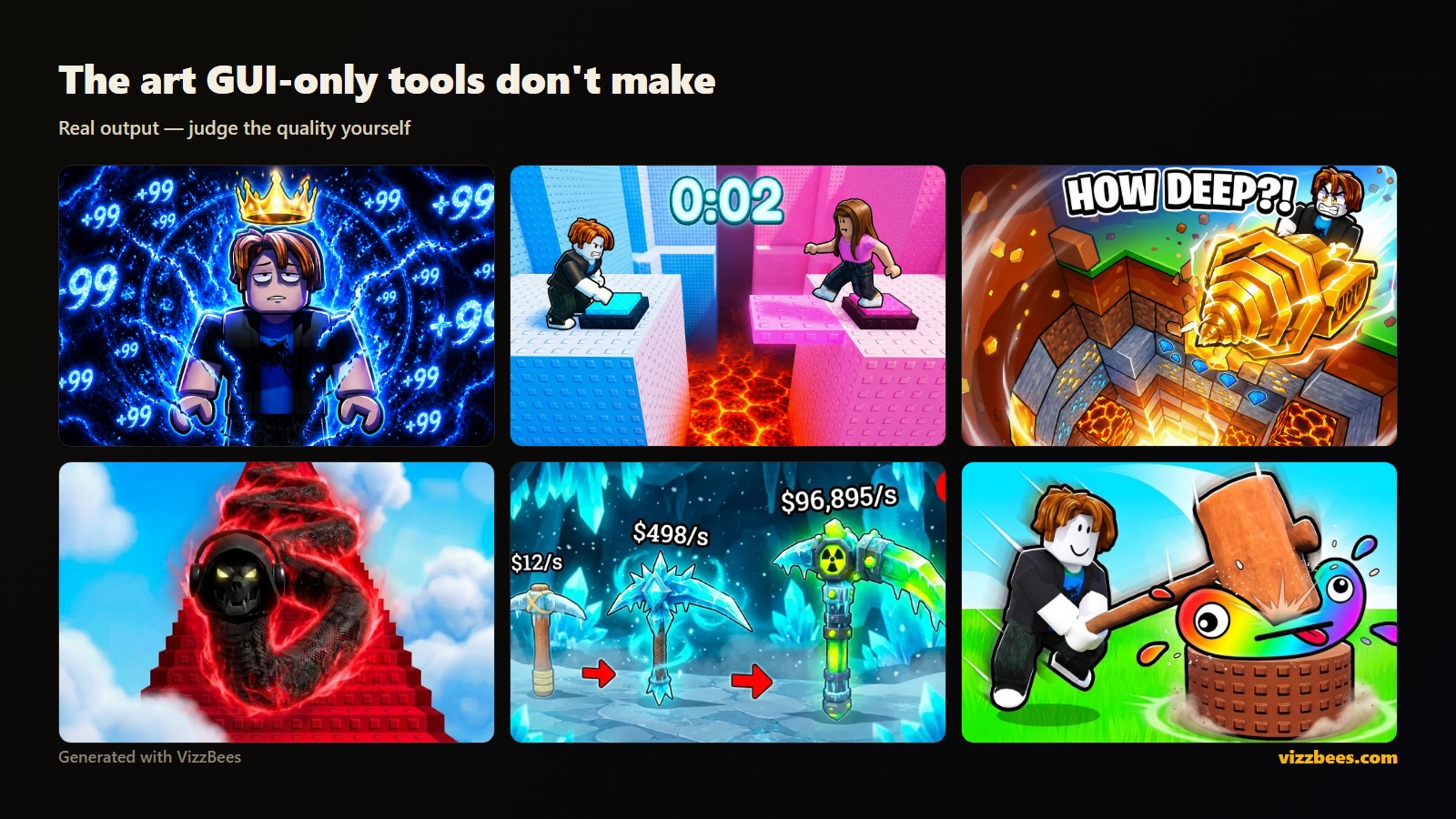
3. Art and UI — not just scaffolding. This is the core difference. The thing that wins the click is your thumbnail and icon, and ForgeGUI doesn't make either. VizzBees runs dedicated engines for thumbnails, icons, and UI, so you cover the surfaces that actually grow a game — not just the interface boxes.
4. Consistent branding across all of it. Because one tool produces your Roblox icon, gallery thumbnails, UI, and YouTube thumbnails, keeping one recognizable style everywhere is effortless — and consistency is what builds brand recall.
5. The only one still innovating. VizzBees keeps shipping — new styles, new features, better output. A tool that stands still gets left behind as feeds and formats change; VizzBees is built to keep improving.
6. Better everything around the generator. Flexible plans, credit-based pricing, fast variant iteration, and a workflow built for creators who ship often — the managing, pricing, and feature set are designed for real production, not a one-off utility.
7. Correct sizes, automatically. Roblox icons (512×512) and gallery thumbnails (1920×1080) at the right dimensions — plus YouTube/Fortnite's 1280×720 — so every asset is upload-ready with zero manual resizing.
See the difference yourself: Generate a Roblox thumbnail with VizzBees free — top-tier quality, seconds-fast, for thumbnails, icons, and UI in one tool.
Pricing: what to actually compare
Pricing for AI creator tools changes often, so instead of quoting numbers that go stale, here's the framework — and where VizzBees lands on it:
- Model: VizzBees uses flexible credit-based plans that scale from occasional use to shipping assets weekly. Match the plan to how often you actually publish.
- Free tier: you can test real VizzBees output before paying — always generate a few and judge the quality yourself.
- Cost per usable asset: this is the real metric. A tool that nails a publishable thumbnail in one or two tries beats a cheaper one that needs five — and one tool covering art and UI beats paying for two. VizzBees' higher quality and broader scope often mean the lower real cost.
- Ownership: you get full commercial rights to what you generate.
Run the same brief through both free tiers, count how much each actually covers of what you ship, and let quality-and-coverage decide.
How to choose in 60 seconds
Ask yourself:
- Do I need the visuals that grow my game, or just interface boxes? If thumbnails and icons matter — and for anyone trying to grow, they do — VizzBees is the pick. If you genuinely only need bare GUI scaffolding, ForgeGUI covers that.
- Will I ever create outside Roblox GUI? Thumbnails, icons, YouTube, Fortnite — the moment you do, a GUI-only tool makes you switch apps. VizzBees already covers all of it, each surface purpose-built.
For almost every creator trying to grow a game rather than just lay out a menu, the answer is VizzBees.
The bottom line
ForgeGUI is a simple GUI-only option for developers who want quick interface scaffolding and don't need art. VizzBees is the stronger tool on the things that decide your growth — output quality, generation speed, per-surface craft, and a product that keeps innovating — across thumbnails, icons, UI, and every platform you publish to. Most creators need the art that wins the click, not just the interface behind it. It's the best pick for anyone serious about growing a game.
Try it on your own game: Create your thumbnail with VizzBees → — free to start, best-in-class quality, thumbnails + icons + UI, ready-to-upload sizes.
FAQ
Is VizzBees better than ForgeGUI? For output quality, range, and the art that actually grows a game — yes. VizzBees produces high-quality thumbnails, icons, and UI, covers Roblox, Fortnite, and YouTube, and keeps shipping new features. ForgeGUI is only the pick if you strictly need bare Roblox GUI scaffolding and nothing else.
What's the main difference between VizzBees and ForgeGUI? Scope and class. ForgeGUI does one narrow thing — GUI scaffolding inside Studio. VizzBees is built for the visuals that win players (thumbnails, icons) plus UI, each purpose-built, with higher quality and ongoing innovation, so your branding stays consistent and top-tier everywhere.
Are VizzBees and ForgeGUI free? Both offer a way to try before you buy. Test the same brief in each free tier and compare what each actually covers — and the quality — before choosing a paid plan. (Check each site for current pricing.)
Does ForgeGUI make Roblox thumbnails? No — ForgeGUI is a GUI scaffolding tool and doesn't make thumbnails or icons. VizzBees makes Roblox icons (512×512), gallery thumbnails (1920×1080), UI, and YouTube/Fortnite sizes (1280×720), each purpose-built for its surface.
Which is better for a Roblox dev who wants both UI and thumbnails? VizzBees, clearly — it makes thumbnails, icons, and UI in one place, each purpose-built, with consistent branding, so you never switch tools or re-learn a workflow.
Can I switch from ForgeGUI to VizzBees easily? Yes. There's nothing to migrate — just describe your game in VizzBees and generate. You keep your direction and extend it from UI to the thumbnails and icons that actually grow the game, at higher quality.